

🌿 Email Sequences: Automating Heart-Centered Connection
Email sequences help you automate your client engagement and relationship-building over time. Think of a sequence as a flow-chart that triggers certain actions—like sending an email—after specific events take place in your practice.
By setting up automatic workflows, you can provide continuous support, grounding advice, and helpful information without adding manually repetitive tasks to your day.
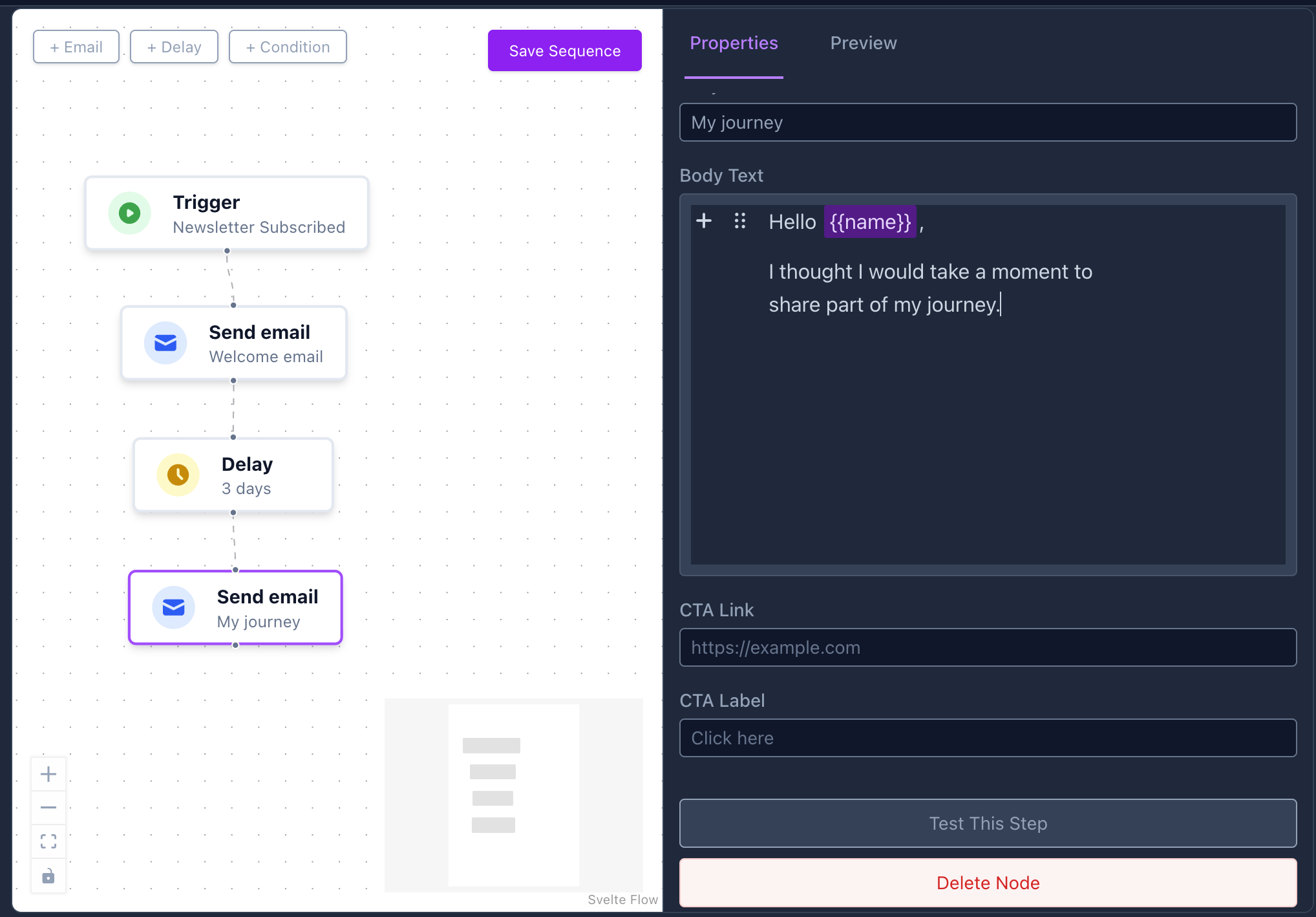
⚡ Triggers: When a Sequence Starts
The “Start” node initiates the journey. Every time a specific event happens, the system finds matching sequences and places the client at the beginning.
Here are the primary types of triggers:
1. Newsletter Subscribed
- When it fires: Immediately when a client joins your list or newsletter through a subscription form.
- Best used for: A Welcome Series. Thank them for subscribing, introduce your core philosophy, provide a free resource (like a downloadable workbook or reading), and explain how you can support their steps.
2. Booking Made
- When it fires: Right after a client schedules a time or pays for a session on your calendar.
- Best used for: Session Preparation. Send a note with grounding techniques, set intentions, or list any practical instructions (e.g., Zoom links, what to wear, dietary advice) to calm the nerves and prepare the energy for the appointment.
3. Booking Completed
- When it fires: Following the completion of a session on your calendar.
- Best used for: Aftercare & Follow-ups. Provide hydration advice, journaling prompts to process the session, or recommend a specific next offering to deepen the progress.
4. Manual
- When it fires: Initiated intentionally by a user or practitioner.
- Best used for: Targeted outreach or custom enrollment steps.
🧩 Building Blocks of a Sequence
When editing a sequence using the visual editor, you can connect the following steps (nodes) to define the path:
🟢 Start
The entry point. You configure which trigger starts this sequence. You can also filter based on Session Type, allowing you to create customized paths for different offerings.
⏳ Delay
Pauses execution. Configure the number of minutes, hours, or days before moving to the next node. Allows for natural intervals (e.g., waiting 2 days after a session to ask for feedback).
Creates and delivers an email message. You specify the subject and the layout content. You can insert dynamic variables to make each email feel personalized.
🔀 Condition
Creates branching logic based on context:
- Session Type Matching: Send different emails based on whether they booked a specific consultation vs an assessment.
- Check Item Completed: Check if a specific task from their checklist (like “Set up profile”) has been finished.
- Functions:
- Is Onboarded?: See if they’ve completed the initial setup.
- Has Logged In?: Check if they’ve accessed the platform yet.
- Is First Booking?: Check if this is a brand new client.
- Is Subscribed?: Verify their marketing notification status.
🧬 Using Dynamic Variables
To make your emails feel direct and personalized, you can use dynamic variables following the template structure {{variable_name}}.
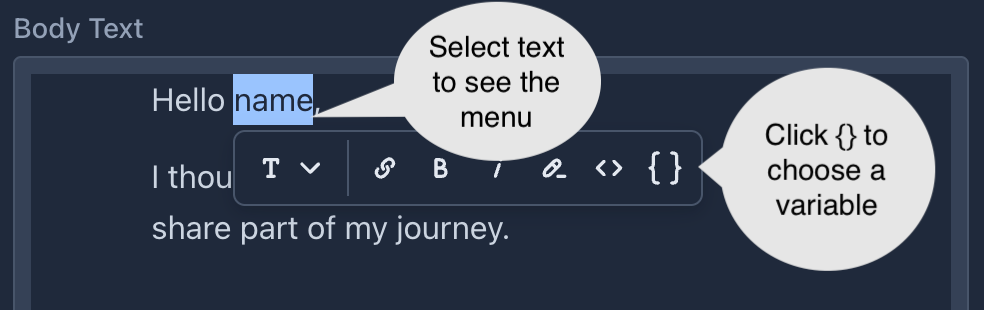
Common variables you can use:
{{name}}– The client’s full name.{{org_name}}– Your Organisation Name.{{public_org_url}}– Your public booking profile link.
💡 Practical Engagement Strategies
Here are three common ideas you can implement to boost engagement immediately:
1. The 3-Step Welcome Series (Newsletter trigger)
- Step 1: Send immediately with a welcome workbook or reading to validate their step.
- Wait 3 days: Share a short story about your healing journey or core beliefs to build trust.
- Wait 7 days: Introduce your primary services and invite them to book a free introductory call.
2. Pre-Session Intention Prep (Booking Made trigger)
- Step 1: Send intention tips & Practical instructions right after booking.
- Wait 1 day before session(handled by manual logic or delaying): Reminder of intentions and a link to a relaxation track.
3. Gentle Post-Session Aftercare (Booking Completed trigger)
- Step 1 (Wait 1 Hour): Remind them to drink water, rest, and Ground.
- Wait 2 Days: Send a journaling prompt to help integrate the energy shift.
- Wait 14 Days: Ask how they are doing and present the next stage offering for follow-up support.